|
| Online enrollment and online contribution changes are available for all eligible employees and active participants of agencies that have adopted the CalPERS 457 Plan.
The CalPERS 457 Plan is designed with our participants’ interests in mind, which is why the Plan has added online functionality to make it even easier for employees to first join the Plan and then update their dollar amount saving per pay period on the journey to and through retirement. Enrollment and contribution change notifications are time-sensitive and may impact payroll processing. Maintaining accurate contact roles and system access helps ensure participant elections are received and implemented timely.
|
Employer resources for online enrollment and contribution changes Online Enrollment FAQ for Employers Online Contribution Change FAQ for Employers Retrieving an Online Enrollment File through Voya PayCloud Retrieving an Online Contribution Rate Change File through Voya PayCloud CalPERS 457 Plan Administration and Payroll Guide CalPERS 457 Plan Online Enrollment and Contribution Change Notifications Guide |
 |
|
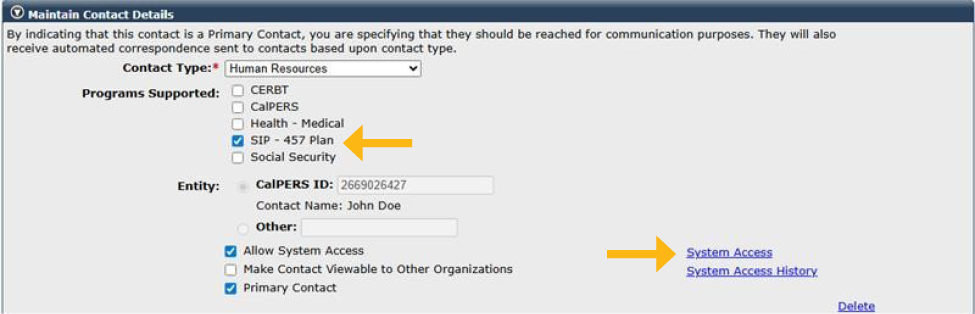
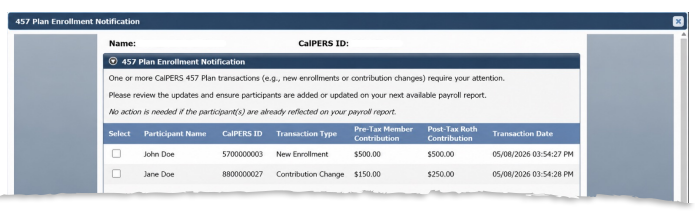
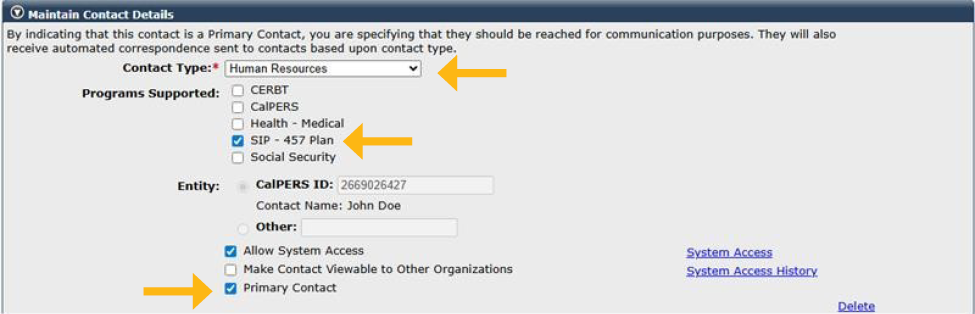
Employers are notified of enrollments and contribution changes through a pop-up notification when logging into myCalPERS. Designated contacts in myCalPERS also receive email notifications that a document is available in myCalPERS Document History. These notifications help employers take any necessary payroll action Employers may also retrieve enrollment and contribution change reports through Voya’s Sponsor Web. These reports include all enrollments and contribution changes received during the prior week. To request access to Sponsor Web or for questions, please email CalPERS_457_Plan@calpers.ca.gov. Review the CalPERS 457 Plan Online Enrollment and Contribution Change Notifications Guide to learn how to maintain appropriate contact information, program selections, and system access to receive online enrollment and contribution change notifications. When you receive a notification by email or through myCalPERS, follow these steps |
||
 |
||
|
||
|
| To receive email notifications | |
|
|
 |
|
| To receive pop-up notifications through myCalPERS | |
|
|
|
|
|
Questions? We want to help. You can call the CalPERS 457 Employer Plan Line at 800-696-3907 or email CalPERS_457_plan@calpers.ca.gov for myCalPERS questions or help with processing enrollments. Email CalPERS_457_plan@calpers.ca.gov to request access to Sponsor Web, which will allow you to view participant and plan level information at any time. |
|
 |
 |
Updated: 08/26/2026 |